Practice Midterm: With Snap! (Fractal):
Due at: Tuesday, March 17th, 23:59
Practice Midterm: With Snap! (Fractal)
Instructions
This worksheet serves as a guide and set of instructions to complete the lab.
- You must use the starter file, found here to get credit for the lab.
Please note: you must use the starter file above, and you must NOT edit the name of any of the required blocks. Failing to do either will result in autograder failure.
Required Blocks
- Block 1: Fall 2018 Fractal
- Block 2: Summer 2018 Fractal
Block 1: Fall 2018 Fractal
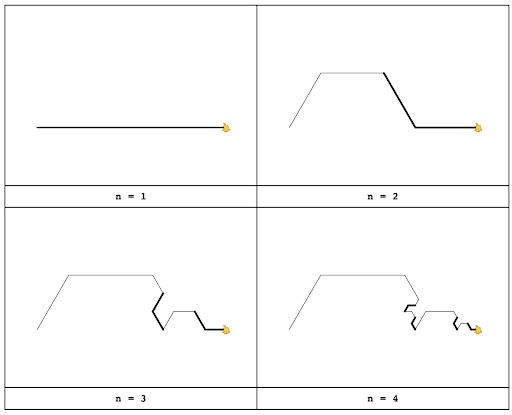
- Below are the first four cases of a box fractal. Your task is the following:
- Load the starter file into Snap! and complete the Fall 2018 Fractal block. Make sure all your code is inside that block, do not put code anywhere else, and do not rename the Fractal block or change its input parameter names.
- Save a PNG image of the fifth (n = 5) iteration and name it **Fractal
.png**. For example, FractalAlanTuring.png - To save a PNG image of the stage, right-click (or control-click) on the stage and choose “pic…”, then in the new tab right-click (or control-click) the image and save the file to the Desktop.
- The length of the lines in any recursive case is 1/3 that of the lines in the previous case. All turns are 60º, but you may need to some math to find how many 60º turns you need; remember at the very end of drawing the fractal, the sprite has to be at exactly the same direction it started. We’ve drawn the fractal with bold lines to highlight the recursive parts, don’t bold your lines, or your code will fail the autograder.
Block 2: Summer 2018 Fractal
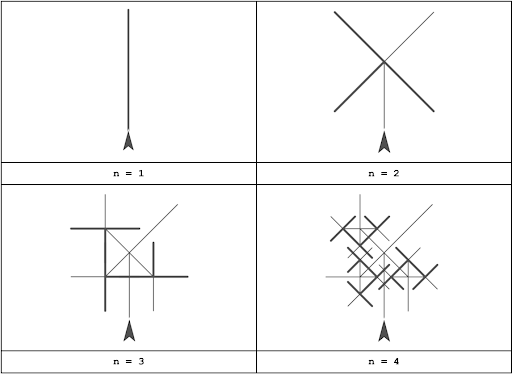
- Below are the first four cases of a box fractal. Your task is the following:
- Load the starter file into Snap! and complete the Summer 2018 Fractal block. Make sure all your code is inside that block, do not put code anywhere else, and do not rename the Fractal block or change its input parameter names.
- Save a PNG image of the fifth (n = 5) iteration and name it **Fractal
.png**. For example, FractalAlanTuring.png - To save a PNG image of the stage, right-click (or control-click) on the stage and choose “pic…”, then in the new tab right-click (or control-click) the image and save the file to the Desktop.
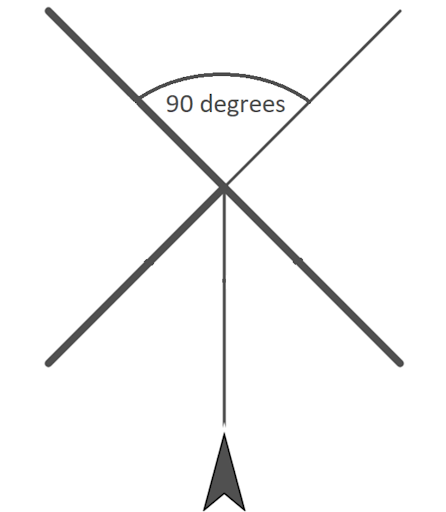
- The length of the lines in any recursive case is 1/2 that of the lines in the previous case. Remember at the very end of drawing the fractal, the sprite has to be at exactly the same direction it started. We’ve drawn the fractal with bold lines to highlight the recursive parts, don’t bold your lines, or your code will fail the autograder.
Submitting
You will need to fill in the blocks under the starter file and submit this to Gradescope.
- To receive full credit, you will need to complete the required blocks. This assignment will be graded solely on completion and effort.
- Export your project using the File –> Export Project… menu option.
Name your submission Fractal
.xml. For example, FractalAlanTuring.xml. Submit your code on Gradescope under the **“Lab Practice Midterm: With Snap! (Fractal)"** assignment. - Remember to submit a screenshot for both fractals at (n=5)!
- For instructions on how to submit to labs to Gradescope, please see this page.