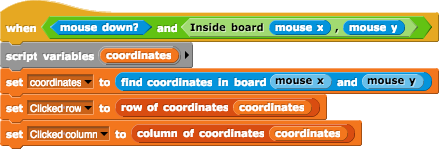
Let's start using our board right away! Here's a thought- wouldn't it be cool to be able to draw our board on the stage, and be able to click on squares and use the clicked (row, column) pairs in our code? Imagine, we could build a chess game where you can actually drag the pieces; we could make battleship where we get to place ships on the board with the mouse... there are tons of fun things we could make.
So first thing's first, we need to actually draw the board. Abstraction is key to programming, so we should write our code such that we can draw any size board!
Let's define some global variables that we should keep track of and use:
Size will define how many tiles per side our board has.

Start will define where we want to start drawing our board from.

Step will define how wide our tiles are when we draw them.

Display width length of one side of the board
The idea here is that our board should be general enough that we can change the size and number of tiles any time we want. If we want our board to always be centered, no matter what value we use for Display width, then what should Start be? If you think about it, if our display width is some number W, then our Start should always be the coordinate (x: -W/2, y: W/2). Determine for yourself where the other corners of the board will be if the top-left is at (x: -W/2, y: W/2) and the display width of the board is W.
How big should the Step, a.k.a. the width and height of the tiles be? We know that the board is going to be Display widthxDisplay width units on the screen. If we want Size tiles to fit in each direction, then they should each be Display width / Size units.
Now that we've set Step to work with any Size, we can set Size to however large we'd like! Let's try 8 for now. While we're at it, let's create and store our board.
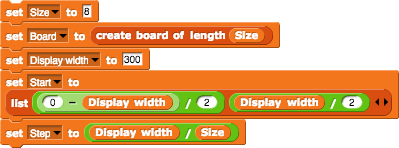
So that's everything we really need to start drawing the board. Draw Square Board is a basic block that draws the borders of our new board according to the global variables we just defined! Try changing the Size variable.
Make sure you understand how the variables we created interact with and depend on each other. This math is important and allows us to make any sized board, with any width, centered automatically for us.
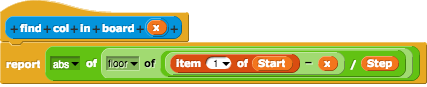
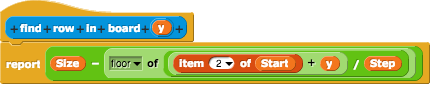
For this portion, we'll use a bit of math to convert the (mouse x, mouse y) coordinates of our clicks into (row, column) coordinates on our board. The following chunks of code have been written for you in the starter file, but make sure you understand them before moving on.
Here is how we can convert mouse x into column:
Here is how we can convert mouse y into row:
Let's put it all together to get a functioning click detector!
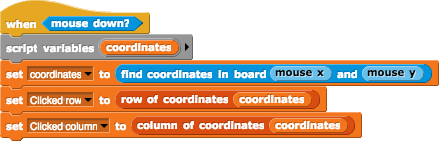
Try clicking on a few spots outside of the board. What coordinates do we get? Does this make sense?
Let's make it so that our click-detecting script doesn't fire when we click outside of the display board. Remember the (x, y) bounds of our board from earlier? Write the Inside Board (x) (y) predicate function that reports whether the given x and y coordinates are inside the board. Note: we're going to be passing mouse x and mouse y coordinates to this block.
Write the inside board block as described.
Once you have that ready, put them together like this to finish off our neat click detector.